
QR / web tipping
5+
things to do
Find a code
Scan it
Wait for the page
Choose who
Enter payment
How Gratuitease works
Gratuitease uses Bluetooth proximity to bring the right worker to the top. No QR code, website, or username search between the service and the tip.
Set up once
Your first visit
01
Download the full app, or use an available App Clip at a participating property.
02
Tip as a guest or sign in quickly with Apple or Google. An account adds persistent tip history.
03
With Apple Pay configured, full card details do not have to be typed into Gratuitease.
Every repeat tip
No repeated account setup. No repeated payment entry. Open the app, tap an amount beside the worker, and confirm with Apple Pay.
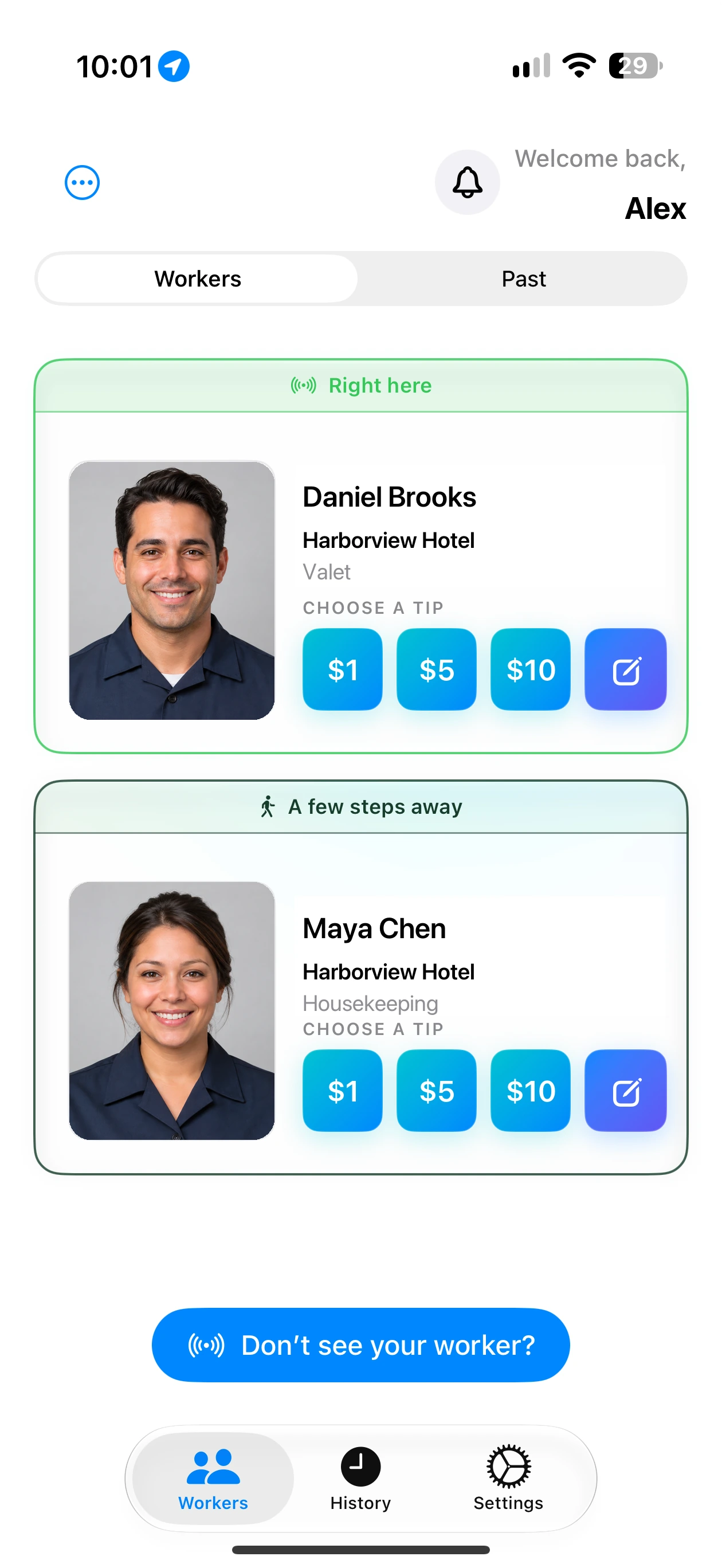
Nearby discovery
01
The nearby list begins refreshing automatically.
02
No venue Wi-Fi, website, QR code, or username is required for discovery.
03
The ranking method remains proprietary; the customer simply gets a better ordered list.
04
Choose a suggested amount or enter a custom gratuity.
05
A normal connected tip can be completed in under ten seconds.
The complete customer flow
Under 10 seconds
Typical connected tip
Zero QR codes
Nothing to locate or scan
Zero usernames
No recipient search
One familiar payment
Apple Pay on iPhone
Compared with other methods
5+
things to do
4+
things to do
3
simple taps
No QR code
No website
No username search
Offline discovery
Competitor flows vary. This comparison represents common category behavior rather than claiming that every provider requires every listed step.
Offline tipping
01
Bluetooth still finds the eligible nearby worker without Wi-Fi or cellular service.
02
The customer selects the worker and amount while the service interaction is still fresh.
03
When connectivity returns, open the pending tip and authorize it with Apple Pay before payment is created.
For workers
Free — use the iPhone
The worker starts the shift once, locks the phone while working, and unlocks it at the tipping moment. The active earning session resumes broadcasting automatically.
Wearable — $5.99/month
The wearable keeps the worker discoverable without requiring the phone to be unlocked or handled during the service interaction.
Privacy without vague language
Location permission enables Apple’s beacon-ranging framework. Gratuitease does not build or store a continuous GPS history, but may record transaction location and proximity events for security, support, fraud prevention, and business analytics.
Read Safety & Privacy